
Good news — a new OnAir installer is now available.
We have resolved the launching issue that some users experienced after recent Windows security updates on certain systems. If you were unable to start OnAir correctly, downloading and installing the new version fixes the problem and allows you to launch OnAir normally again.
This new installer also uses a new Windows signing certificate. Because of this change, Microsoft Defender SmartScreen may temporarily display a security warning when running the installer. This can happen when a new signed installer has not yet built enough reputation with Microsoft.
The installer is properly signed and safe to use when downloaded from our official links.
Download the latest OnAir installer
Windows 64-bit – recommended for most users:
https://auth.onair.company/vpk/x64/OnAirCompany-win-x64-Setup.exe
Windows 32-bit – for older 32-bit Windows systems:
https://auth.onair.company/vpk/x86/OnAirCompany-win-x86-Setup.exe
What to do if Windows displays a SmartScreen warning
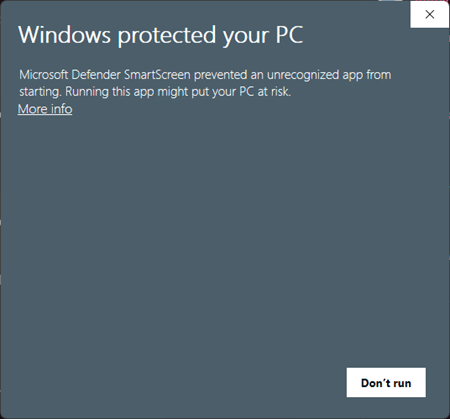
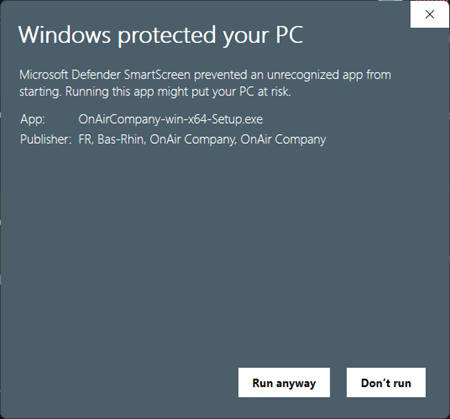
If Windows displays a “Windows protected your PC” message when running the installer, this is expected.
Please follow these steps:
- Click “More info”
- Check that the app is OnAirCompany-win-x64-Setup.exe or OnAirCompany-win-x86-Setup.exe
- Check that the publisher is OnAir Company
- Click “Run anyway”
The installation will then continue normally.
Thank you for your patience while we worked on this issue.
You can also find the download links and SmartScreen instructions in our FAQ here: