
Discord’s built in Webhooks function as an easy way to get automated messages and data updates sent to a text channel in your server.
Think of them as one of those fancy pneumatic tube things you used to love sending money into at a bank and watch disappear, but instead of never seeing your money again, you’re actually sending messages into Discord from another platform.
👉 More info about Discord Webhooks:
https://support.discord.com/hc/en-us/articles/228383668-Intro-to-Webhooks
⚙️ How it works in OnAir
In OnAir, go to the Preferences > Discord Webhooks tab to configure webhook triggers on several events:
• ✈️ Flight started
• 🛬 Flight completed
• ❌ Flight cancelled
We will add other triggers and features after getting feedback:
• 📦 Job partially delivered
• ✅ Job fully delivered
• 🧾 Raw data exports
• …and more!
You can also customize the format and fields included in each message.
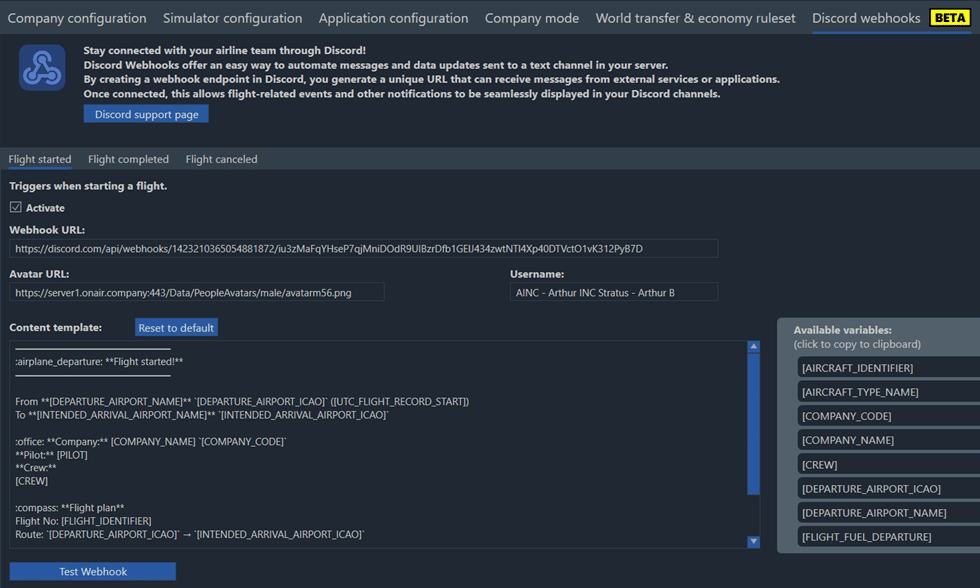
All variables that can be used to modify the default content template for this specific event are displayed on the right.
💡 Need a variable that is not already available? Just submit a ticket
👉 https://onairhelp.zendesk.com
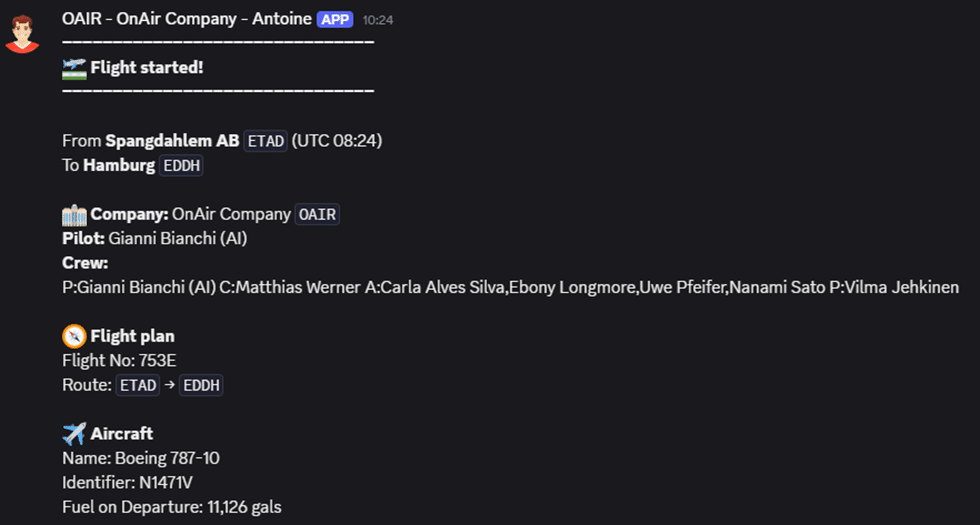
And here’s what it looks like in Discord! 👇
Other Changes
- Added due fuel information in the message “Fuel check disabled for A2A Comanche.”
- Fixed G-force calculation: it’s now ignored while on the ground but always counted during landing.
- When flying regular routes with a freelance crew, flight hours are now also counted for the avatar.
- Fixed cumulative fuel display bug in work orders.